Bulk Edit
Picture this: it's the end of the quarter. You have 500 products that need a 10% price increase. Or maybe a new shipment of 200 items just arrived, and they all need to be tagged as "New Arrival," assigned to the "Main Warehouse" location, and have their status changed from "Pending" to "In Stock."
What's your next move?
For many, it's a sigh, a large cup of coffee, and the soul-crushing task of opening each item, one... by one... by one... and making the same changes over and over. It's not just tedious; it's a recipe for costly mistakes and wasted hours that you and your team will never get back.
What if you could do it all in about 30 seconds? With Maxilist's Bulk Edit Engine, you can.

The Problem with One-by-One and Spreadsheet Juggling
Traditional inventory management often forces you into one of two painful scenarios:
- The Manual Grind: You click through items individually. It's slow, mind-numbing, and every click is an opportunity for human error. Did you update item #147 or #148? Did you forget to change the status on the last ten items?
- The Spreadsheet Scramble: You export your data to a CSV or spreadsheet. You use complex formulas like
VLOOKUPorINDEX/MATCHto make changes, pray you don't break a formula or paste data into the wrong column, save the file, and then re-import it, hoping everything maps correctly. It's powerful, but it's rigid and unforgiving. One mistake can corrupt your entire inventory data.
There had to be a better way. So we built one.
Meet the Bulk Edit Engine 🚀
Our Bulk Edits feature is designed to give you the power of spreadsheet editing with the safety and simplicity of a modern mobile app. It turns hours of work into a few simple taps.
Here's how this game-changing workflow operates:
- Select Your Items: Effortlessly select all the items you need to modify (they will be added to the cart automatically). You can use our powerful search and filtering to quickly find them—for example, filter by "Supplier A" and "Category: T-Shirts."
- Define Your Operations: Tap the "Operate" button. Now, you can build a list of changes you want to apply to every single item in the cart. You can add multiple operations at once!
- Execute & Preview: Perform the operation. Here's the magic: the changes are not permanent yet! Everything is in a "draft mode." You get a clear preview of all the modifications before they are saved. You can see the old value and the new proposed value side-by-side.
- Commit Your Changes ✅: If everything looks perfect, tap "Save" to commit the changes to your database. If you made a mistake, you can simply discard the changes or even use our Intelligent Undo function. No stress, no mess.
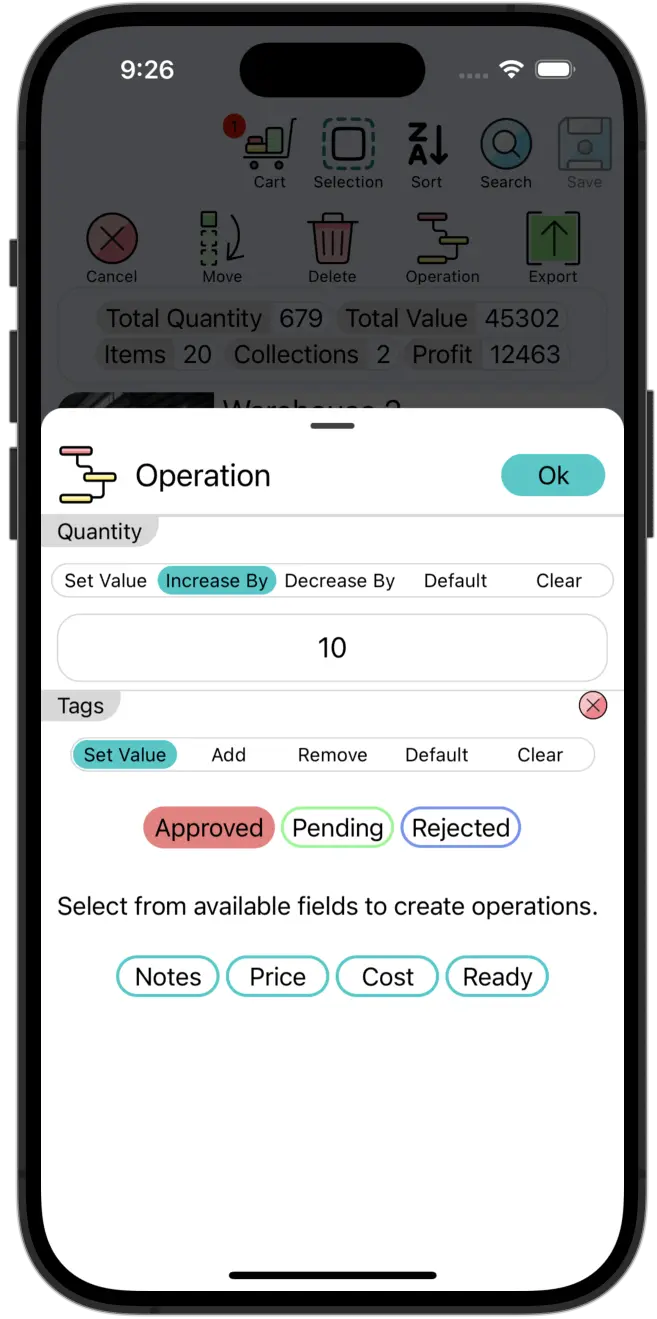
How Bulk Edit Will Transform Your Workflow (Real-World Examples)
This isn't just an abstract feature; it's a tool that solves real, everyday problems across industries.
Use Case 1: The Retailer's Seasonal Sale 🏷️
- The Task: Put all 150 items from the "Summer Collection" on sale for 20% off and add a "Clearance" tag.
- The Old Way: 2-3 hours of manual price calculations and tag editing.
- The Maxilist Way:
- Filter by "Summer Collection."
- Add all to cart.
- Create two operations:
Price = Price * 0.80andAdd Tag: Clearance. - Execute, review, and save. Done in under a minute.
Use Case 2: The Warehouse Manager's New Shipment 📦
- The Task: A pallet with 80 different SKUs arrives. You need to update their location from "Receiving Dock" to "Aisle B4" and change their status to "Available."
- The Old Way: Walking the aisles with a clipboard or a clunky scanner, updating each item individually.
- The Maxilist Way:
- Scan the items or select them from a purchase order list.
- Add to cart.
- Create two operations:
Set Field: Location = Aisle B4andSet Field: Status = Available. - Execute, review, save. Your inventory is updated in real-time before the items even hit the shelves.
Use Case 3: The Restaurant Owner's Batch Update 📅
- The Task: You receive a case of 50 bottles of a specific wine vintage. You need to add the delivery date and the expiration date to all of them.
- The Old Way: Tediously entering the same two dates, 50 times.
- The Maxilist Way:
- Select the 50 bottles.
- Add to cart.
- Create two operations:
Set Field: Received Date = Today's DateandSet Field: Expiration Date = [Future Date]. - Execute, review, save. Perfect accuracy, zero frustration.
The Maxilist Advantage: Safe, Smart, and Simple
Not all bulk editing tools are created equal. Here's why Maxilist stands out.
The "Draft Mode" Safety Net 🛡️
The fear of making a massive, irreversible mistake is real. With spreadsheets, one wrong formula drag can silently corrupt your data, and you might not notice until it's too late. Our draft mode is your safety net. You see every single proposed change before it goes live. This allows you to operate with confidence, knowing you can always back out without consequence.
Comparison: Maxilist vs. The Alternatives
| Feature | Maxilist Bulk Edits | Manual Editing (One-by-One) | Spreadsheet Editing (Import/Export) |
|---|---|---|---|
| Speed | ⚡️ Lightning Fast (Seconds) | 🐌 Excruciatingly Slow (Hours) | 🐢 Slow (Minutes to Hours) |
| Accuracy | ✅ High (Systematic & reviewable) | ⚠️ Low (Prone to human error) | 🤔 Medium (Risk of formula/paste errors) |
| Ease of Use | 😊 Incredibly Intuitive | 😐 Simple but tedious | 🤯 Complex & requires expertise |
| Safety (Undo/Preview) | 🛡️ Excellent (Built-in draft mode) | ❌ None (Changes are instant) | ❌ None (High risk of data corruption) |
Beyond Time Savings: The Ripple Effect 💸
Saving time is just the beginning. The benefits of efficient bulk edits ripple throughout your entire business.
- Happier, More Productive Teams: You didn't hire your team for mind-numbing data entry. By automating tedious tasks, you free them up to focus on what matters: customer service, sales, and growing the business. It's a massive boost to morale.
- Unquestionable Data Accuracy: Clean, reliable data is the foundation of good business decisions. When your inventory data is consistently accurate, you can trust your reports, forecast demand better, and avoid costly stockouts or overstocking.
- Increased Agility: The market changes fast. Need to react to a competitor's price drop? Launch a flash sale? You can now make these massive changes instantly, keeping you agile and competitive.
Frequently Asked Questions (FAQ)
What kind of fields can I change in bulk?
Almost any field you have! This includes text fields (like notes), number fields (like price or quantity), dates, tags, and any Dynamic Custom Fields you've created. You can even use our Equation Engine in bulk edits for powerful calculations!
How many items can I edit at once?
Our system is built for performance. While limits depend on your device, you can easily edit hundreds or even thousands of items in a single edit.
What happens if I make a mistake and save the changes?
Our "draft mode" is your first line of defense. But even after saving, our Comprehensive Activity History tracks every change. Depending on your subscription, you can review past changes, and our Intelligent Undo feature can often revert the last action.
Is this feature available on all Maxilist plans?
Yes! The Bulk edits Engine is a core part of the Maxilist experience, designed to provide immense value to all our users, from individuals managing a collection to large businesses managing multiple warehouses.